· Rumtoo Process Team · Technical Guide · 12 min read
Plastic Recycling Machines for 3D Printers: Which Setup Fits Your Waste Volume?
A buyer's guide to choosing the right plastic recycling machine for 3D printer waste. Covers desktop shredders, filament extruders, and semi-industrial lines — organised by monthly waste volume so you buy the right tier, not the most expensive one.
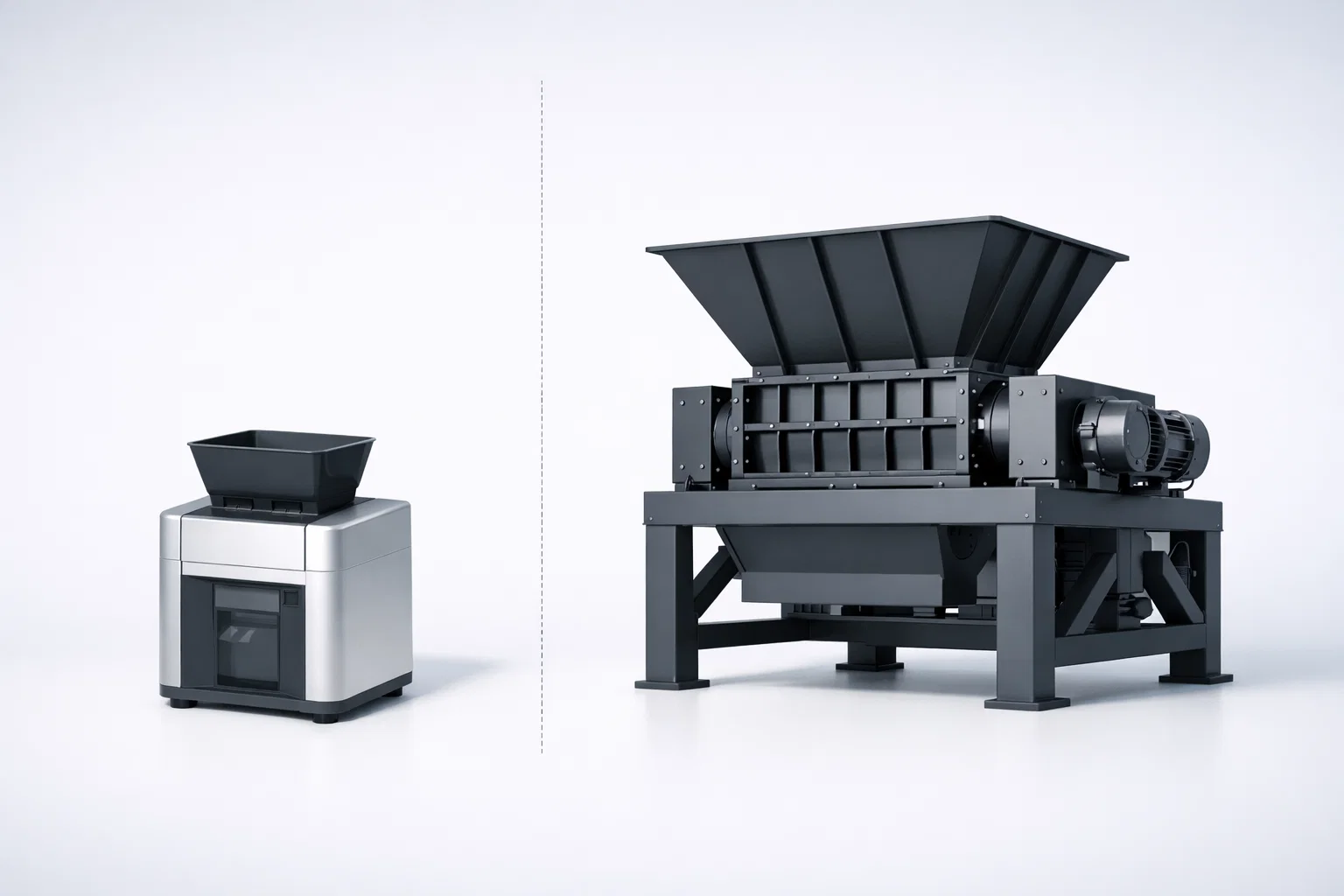
A commercial prototyping studio in Stuttgart bought a 15 kW industrial shredder to process their 3D printing waste. The machine sat idle for 27 out of every 30 days. Their monthly waste volume was 8 kg — the industrial unit needed a minimum feed of 200 kg per run to operate efficiently. They eventually sold the shredder at a loss and replaced it with a desktop shredder and filament extruder combo, which processed their entire month’s waste in a single two-hour session.
The machine mattered far less than the volume. And that is the problem with most buying guides for plastic recycling machines for 3D printers: they list products without first asking how much waste you actually generate per month. This guide answers that question first, then recommends a machine tier matched to your output.
Why Most Buyers Choose the Wrong Machine
The market for 3D printer plastic recycling equipment spans four orders of magnitude in price — from a $200 DIY shredder kit to a $60,000 industrial compounding line. Most buyers anchor on brand familiarity or price alone. Neither is the right starting point.
The correct starting variable is your monthly waste volume, measured in kilograms. Every other specification — throughput rating, motor power, particle size output, filament diameter tolerance — flows from that single number.
The Three Tiers of 3D Printing Waste Volume
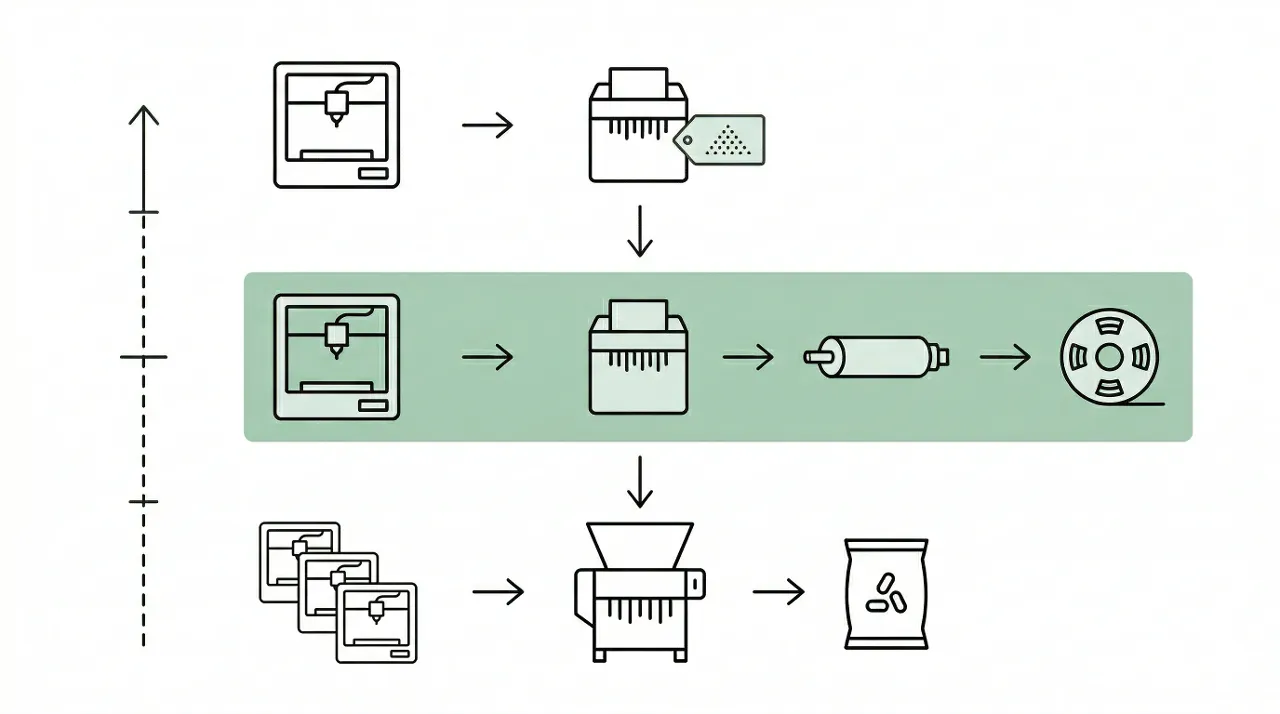
| Tier | Monthly Waste | Typical Operator | Recommended Setup |
|---|---|---|---|
| Tier 1 | < 5 kg | Hobbyist, small studio | Desktop shredder only |
| Tier 2 | 5–30 kg | Makerspace, university lab, prototyping studio | Desktop shredder + filament extruder |
| Tier 3 | 30 kg+ | Print farm, production facility | Industrial shredder → pelletizing line |
Identify your tier before reading anything else. Then read only the section that applies to you.
Tier 1 — Under 5 kg/Month: Start with a Shredder Only
If your operation runs one to four desktop FDM printers and generates less than 5 kg of failed prints, supports, and purge material per month, a standalone desktop shredder is the right starting point — and probably the only piece of equipment you need for the next 12–18 months.
What a Desktop Shredder Does (and Does Not Do)
A desktop shredder converts 3D printing scrap into granules of 3–6 mm. That output is usable in several ways without a filament extruder:
- Injection molding feedstock for labs and makerspaces with a benchtop injection unit
- Material testing specimens — shredded regrind presses cleanly into dog-bone molds for tensile testing
- Donated or sold regrind — several makerspace networks and university departments will accept clean, sorted regrind rather than purchase virgin pellets
- Stored feedstock for a filament extruder you plan to add later
What a shredder does not do is produce printable filament. For that, you need an extruder downstream. At Tier 1 volumes, the financial case for adding an extruder does not close quickly enough — a desktop filament extruder adds $1,500–$4,000 of equipment cost, and recovering 4 kg/month of PLA at $25/kg only yields $100/month in saved material. The payback period stretches to 15–40 months on the extruder alone.
Recommended Configuration for Tier 1
The Rumtoo mini desktop shredder fits this use case directly. Its 1.5 kW geared drive, 120 × 200 mm feed opening, and dual knife sets (Set A at 5 mm spacing, Set B at 3 mm spacing) are sized for batch processing of 1–5 kg per session. At this scale, a single weekly shredding session of 30–60 minutes handles the full month’s waste with time to spare.
Key specs to verify for any Tier 1 machine:
- Feed opening: Large enough for failed prints without pre-cutting every piece (minimum 100 × 180 mm)
- Noise rating: Below 60 dB if the unit is in a shared workspace or apartment studio
- Forward/reverse control: Eliminates the need to open the cutting chamber to clear jams — this matters more than throughput rating at low volumes
ROI Calculation for Tier 1
| Factor | Monthly value |
|---|---|
| Scrap weight recovered | 3–5 kg |
| Regrind value (at $18/kg for sorted PLA regrind) | $54–90 |
| Electricity cost (0.8 kWh/h × 1 h × $0.12/kWh) | < $0.10 |
| Blade maintenance (amortised) | ~$3/month |
| Net monthly gain | $51–87 |
| Desktop shredder cost | ~$1,200–1,800 |
| Payback period | 14–35 months |
At Tier 1, the financial case is modest. The stronger argument is often environmental — removing plastic from landfill — plus the downstream benefit of having clean regrind on hand for injection molding or material testing projects.
Key Takeaway: If you generate less than 5 kg/month, buy a desktop shredder only. Do not buy an extruder yet. Revisit in 12 months when your operation scales.
Tier 2 — 5 to 30 kg/Month: The Shredder + Extruder Combination
This is the most common setup among university labs, active makerspaces, commercial prototyping studios, and mid-size print farms. At 5–30 kg/month, the economics of producing your own recycled filament become compelling, and the equipment investment recovers in 8–18 months in most scenarios.
Why This Is the Most Common Setup for Makerspaces and Labs
The Tier 2 volume range represents operations running 5–25 FDM printers, consuming 8–40 kg of filament per month, and generating 1–6 kg of scrap per week. A desktop shredder processes this in two to four sessions per week, each lasting 30–90 minutes. The shredder output feeds a desktop filament extruder that runs 4–8 hours per week and produces 1.75 mm or 2.85 mm filament directly from the regrind.
A community makerspace in Portland, Oregon, documented this setup in detail. Running 16 FDM printers, they generated approximately 4–5 kg of waste per month. After adding a desktop shredder and filament extruder, they recovered $800–1,000 per year in filament value and converted the recycling station into their most popular member workshop — the sustainability program justified the equipment cost beyond the raw financials. Their complete workflow is documented in the filament recycling workflow guide.
Key Specs to Evaluate for Tier 2 Equipment
For the shredder:
- Throughput rating: 1–8 kg/h is appropriate; higher throughput ratings are irrelevant at this volume
- Particle size output: 3–6 mm matches the feed requirements of most desktop filament extruder screws. Finer output (Set B configuration) is needed for extruders with small-diameter feed screws
- Reversible motor: Non-negotiable for any shared-use environment where operators have varying experience levels
For the filament extruder:
- Temperature range: Minimum 250 °C to handle PLA, PETG, and ABS. 280 °C+ required for Nylon and PC
- Diameter tolerance: ±0.05 mm is achievable with recycled regrind on a quality desktop extruder; ±0.02 mm requires virgin pellets and more precise process control
- Output rate: 0.5–1.5 kg/h is typical for desktop units — adequate for 5–30 kg/month Tier 2 operations
The Rumtoo desktop filament extruder range covers 1.75 mm and 2.85 mm output nozzles, three-zone temperature control from ambient to 280 °C, and integrated speed control for diameter adjustment. The units are designed to accept regrind directly from the mini desktop shredder without a screening step in most PLA and PETG workflows.
ROI Calculation for Tier 2
| Factor | Monthly value |
|---|---|
| Monthly scrap volume | 10–15 kg |
| Filament produced (at ~80% recovery rate) | 8–12 kg |
| Filament cost saved (at $25/kg) | $200–300 |
| Electricity (shredder + extruder, ~6 h/month) | ~$1.50 |
| Blade and maintenance (amortised) | ~$8/month |
| Net monthly savings | $190–290 |
| Equipment cost (shredder + extruder) | ~$3,500–6,000 |
| Payback period | 12–32 months |
At 15 kg/month of waste and $25/kg filament, the payback period typically lands around 15–20 months — faster for operations where the recycled filament displaces higher-cost specialty materials.
Key Takeaway: Tier 2 is where the full shredder + extruder combination makes economic sense. The desktop R&D units range covers both pieces of equipment in configurations matched to this volume range.
Tier 3 — 30 kg/Month and Above: Moving Toward Semi-Industrial Equipment
At 30 kg/month and above, desktop equipment reaches its practical limits — not in throughput (a 1.5 kW shredder can still handle this volume in 6–10 hours per month), but in consistency and automation. Operations generating 30–200 kg/month of 3D printing waste typically also process other rigid plastic scrap alongside printing waste, which changes the equipment requirements substantially.
When to Consider an Industrial Shredder or Pelletizing Line
Three signals indicate you have outgrown desktop equipment:
- Material diversity: You are processing not just 3D printing waste but also injection molding sprues, HDPE containers, PP caps, and other rigid plastic streams. Desktop machines handle these adequately at low volumes; above 30 kg/month, the combination of material types and volumes benefits from an industrial shredder with a larger cutting chamber and higher motor power
- Filament quality requirements: If your operation uses recycled filament for functional, load-bearing, or precision parts, a pelletizing line produces more consistent melt homogeneity than a desktop extruder operating on mixed regrind
- Operator bandwidth: Batch shredding 30+ kg per month on a desktop unit requires 10–15 operator-hours monthly. A semi-industrial unit with automated feeding and larger hopper capacity reduces this to 2–4 hours
For Tier 3 operations, contact the Rumtoo process team with your monthly material volume by type. Equipment at this scale is configured to the specific material mix and output requirements of each facility, rather than selected from a standard product range.
Material Compatibility: What Each Tier Can Handle
Not all 3D printing materials process equally across machine tiers. The table below summarises compatibility across the three setup tiers:
| Material | Tier 1 (Shredder only) | Tier 2 (Shredder + Extruder) | Notes |
|---|---|---|---|
| PLA | ✅ Excellent | ✅ Excellent | Easiest material across all tiers. Brittle — shreds cleanly |
| PETG | ✅ Good | ✅ Good | Must dry regrind at 65 °C for 4–6 h before extrusion |
| ABS | ✅ Good | ✅ Good | Process with ventilation; trace styrene odour during shredding |
| HDPE / PP (caps, containers) | ✅ Good | ✅ Good | Irregular particle shape; not ideal for direct re-extrusion into filament |
| Nylon (PA) | ⚠️ Moderate | ⚠️ Moderate | Pre-cool parts; dry 8–12 h at 80–85 °C; inconsistent shredding |
| Polycarbonate (PC) | ⚠️ Moderate | ⚠️ Moderate | Reduce feed rate; pre-cut large parts |
| CF / GF filled filament | ❌ Avoid | ❌ Avoid | Severe blade wear; dedicated abrasion-resistant blades required |
| TPU / flexible | ❌ Avoid | ❌ Avoid | Wraps around rotor; not suitable for standard desktop shredders |
Key Specs Buyers Often Overlook
Throughput (kg/h) vs. Your Monthly Volume
Throughput ratings on shredder and extruder spec sheets describe peak continuous capacity. Real-world desktop operation is batch-based, not continuous. A shredder rated at 5 kg/h handles 30 kg/month of waste in six one-hour sessions — once a week. Buyers consistently overweight throughput rating and underweight feed opening size, noise level, and ease of blade cleaning.
Particle Size Output and Extruder Compatibility
The most common reason a shredder-extruder combination fails to produce consistent filament is a mismatch between shredder particle size output and extruder feed screw geometry. Most desktop filament extruders accept particles of 3–6 mm. If your shredder produces particles averaging 8–10 mm (common in units without a screen or with widely spaced blades), you will see surging, inconsistent melt pressure, and filament diameter variation. Verify the particle size range of any shredder against the hopper and feed screw specifications of your target extruder before purchasing.
Noise Level in Shared Spaces
Industrial shredder noise levels run 80–105 dB — requiring hearing protection and, in most cases, a dedicated room with acoustic treatment. The Rumtoo mini desktop shredder operates below 55 dB, comparable to a normal conversation. If your recycling station is in a shared makerspace, university lab, or open-plan studio, noise rating is a critical selection criterion that rarely appears in buyer guides.
Frequently Asked Questions
Can I recycle 3D printing waste without a filament extruder?
Yes. A shredder alone produces 3–6 mm regrind that is usable for injection molding feedstock, material testing specimens, and donation or sale to facilities with extrusion equipment. You do not need a filament extruder to start recycling — and at volumes below 5 kg/month, the extruder investment typically does not pay back fast enough to justify it in the first 18 months.
What is the minimum budget to start recycling 3D printing waste?
A purpose-built desktop shredder suitable for PLA, PETG, and ABS starts at approximately $1,200–1,800. DIY shredder kits based on open-source designs (Precious Plastic, Filastruder) can reach as low as $200–400, but require significant build time and produce inconsistent particle sizes. For a complete shredder + extruder setup producing usable filament, budget $3,500–6,000 for quality desktop equipment.
Can one machine handle both shredding and extrusion?
Integrated machines like the ReDeTec ProtoCycler combine a grinder and extruder in one unit. These suit Tier 1 operations prioritising convenience over throughput. Their limitation is capacity: integrated units typically process 0.3–0.8 kg/h, which works for hobbyists generating 1–3 kg/month but becomes a bottleneck at Tier 2 volumes (5–30 kg/month). Separate best-in-class shredder and extruder units outperform integrated machines at Tier 2 volumes in consistency, throughput, and ease of maintenance.
How do I know if my regrind quality is good enough to re-extrude?
Extrude a small test sample (100–200 g) and observe the filament surface visually. Bubbles or foaming indicate excess moisture — return to the dryer for another cycle. Rough or irregular surface texture with no bubbles suggests contamination from a different polymer type in the batch. Consistent shiny surface with diameter staying within ±0.05 mm of your target indicates usable regrind. For labs with access to a moisture analyser, target less than 0.05% moisture content for PLA and less than 0.02% for PETG.
What materials cannot be recycled with desktop equipment?
Carbon fibre and glass fibre filled filaments cause extreme blade wear on standard desktop shredders — H13 tool steel blades rated for 300+ hours on unfilled PLA may wear out in under 50 hours on CF-PLA. TPU and other flexible filaments wrap around the rotor rather than shearing, risking jam and motor damage. Parts with embedded metal inserts (heat-set brass fittings, M3 nuts) must have all metal removed before shredding. If your waste stream contains a significant proportion of these materials, contact the Rumtoo process team for blade configuration and pre-processing options.
Next Steps
Calculate your average monthly waste volume in kilograms — by material type if possible. That number determines whether a Tier 1, Tier 2, or Tier 3 setup is appropriate.
For Tier 1 or Tier 2 operations, the mini desktop shredder and desktop filament extruder range cover most requirements. Detailed workflow documentation is available in the companion guide: How to Recycle 3D Printing Waste: From Failed Prints to Reusable Regrind and From Scrap to Spool: The Complete Filament Recycling Workflow.
For Tier 3 volumes or mixed plastic streams that include materials beyond standard FDM filaments, contact the Rumtoo process team at /contact with your monthly volume by material type. We will specify a configuration — shredder model, screen size, downstream equipment — matched to your actual throughput requirements.
Related pages:
- plastic recycling machine for 3d printer
- filament recycling
- desktop shredder
- 3D printing waste
- filament extruder